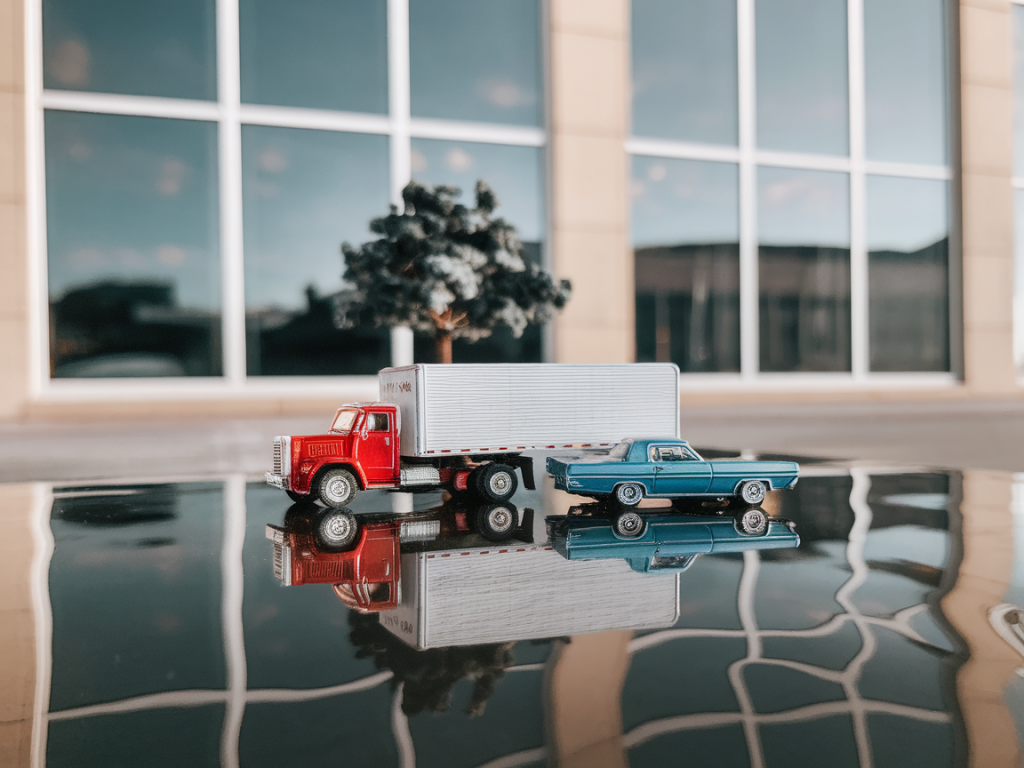
I love photographing small, reflective objects — tiny painted metal robots, glossy ceramic miniatures, varnished paper dioramas — because they sit right at the intersection of craft, light and illusion. But glare and nasty reflections can quickly kill the magic. Over the years I’ve developed a handful of simple, repeatable techniques using inexpensive modifiers and a little patience. Here’s how I approach reflective miniatures so you get crisp detail, controlled highlights and a sense of depth without distracting hotspots.
Why glare is especially tricky with miniatures
Small reflective surfaces behave differently from larger objects. The highlights are tighter, reflections can contain your studio and camera, and slight changes in angle produce big differences in the look. Add close-up lenses or macro setups and the problem compounds: lenses capture more of the environment and the scale makes specular highlights overpower the form.
My basic setup
My go-to configuration is intentionally modest: a DSLR or mirrorless camera with a macro lens (I often use a 90–105mm macro), a small tripod, a low-angle LED lamp (a Lume Cube or an Ikea Solvinden-style lamp works fine), and a few DIY modifiers. I work on a stable table near a window, but most of the modelling comes from the modifiers, not ambient light.
Simple modifiers that make a big difference
These are the tools I reach for before I even think about Photoshop.
- Diffusers: Any translucent material — tracing paper, baking parchment, a white shower curtain, or a small photo softbox — will soften falls of light. For micro work, I cut small rectangles of parchment or frosted polypropylene that sit between lamp and subject.
- Flags/gobos: Black cards (foamboard or black cardstock) block unwanted reflections and let you shape highlights precisely. I keep a set of small rectangles and triangles to tuck in around the miniature.
- Polarising filter: A circular polariser on the lens can reduce glare from non-metallic reflective surfaces (glossy paint, varnish, plastics) and deepen colors. It won’t remove reflections of objects in the scene, but it’s a quick first step.
- Cardboard tunnels: For mirror-like surfaces a simple cardboard tube or folded box creates a controlled strip of light, resulting in long, elegant highlights rather than chaotic spots.
- Reflector cards: White foamboard or silver/gold reflectors add subtle fill and color warmth. I position them to bounce controlled light into shadowed areas while keeping direct reflections minimal.
How I position lights and modifiers
Start with a single light source and modify from there. One clean, soft light gives shape and avoids multiple competing reflections.
- Place your diffused light at a higher angle than the subject to create soft top highlights. For tiny objects this mimics a natural sun direction and avoids reflections of the camera.
- Use flags close to the miniature to block the lamp from creating unwanted specular spots. Because the surface is small, the flag needs to be close to the object — often just a few centimetres away.
- Create a tunnel if the subject is highly reflective. I cut a slit in a piece of black foamboard and lay a strip of translucent material above it. The result is a long, controlled highlight that emphasizes shape rather than chaotic mirror-like reflections.
- Add a reflector opposite the key light for gentle fill. If you need more drama, swap the white card for silver; for warmth try a small piece of gold-toned foil or a scrap of warm paper.
Working around metallic finishes
Metallic paints and chrome finishes are unforgiving because they mirror everything. I use these tactics:
- Control the environment: Clear the immediate area of bright colours and reflective objects. Even your own shirt can show up in polished chrome.
- Use long, soft highlights: A stripbox or a narrow cardboard tunnel produces pleasing reflections on metal. Avoid a bare bulb or tiny LEDs that create hard hotspots.
- Shift angles: Small changes in camera height or lateral position often move the reflection off the lens. Tilt the miniature, not the camera, to preserve background perspective.
- Combine polariser with diffused light: A polariser attenuates glossy reflections on painted surfaces, while your diffuser softens the remaining highlights into something cinematic.
Macro-specific considerations
Close-up work requires attention to depth of field and motion. Here’s what I do:
- Use a small aperture (f/8–f/16) to increase depth of field. With very small subjects, focus stacking can help — take multiple frames focused at different points and combine them in software (Helicon Focus, Zerene Stacker or Photoshop).
- Keep ISO low and use a tripod. Reflections are more noticeable when noise creeps into shadow areas.
- Use a remote trigger or mirror lock-up to avoid camera shake. Even breathing can nudge a macro shot.
DIY modifiers I keep in my studio
Most of my best results come from humble materials. Here’s a small table of quick builds I use all the time.
| Modifier | Materials | Use |
|---|---|---|
| Mini stripbox | Black foamboard, tracing paper, tape | Creates long, soft highlights for shiny surfaces |
| Folded tunnel | Cardboard tube, white diffusing paper | Controls reflections on metallic finishes |
| Micro flags | Black cardstock, bamboo skewers | Blocks tiny specular spots and shapes shadows |
| Reflector cards | White foamboard, aluminium foil | Soft fill or warm fill depending on side used |
When to embrace reflections
Not all reflections are enemies. Sometimes a carefully placed reflection adds context, mood or a sense of scale. I’ll use a thin mirror or a glossy black surface under a miniature to create a subtle doubled image — but only after I’ve eliminated conflicting highlights. The trick is deliberate placement: the reflected element must add to the story rather than distract from it.
Post-processing tips
I prefer getting the photograph right in camera, but a little editing polishes the result:
- Use local dodging and burning to refine highlights and shadows without altering the object’s natural sheen.
- Clone out small, unwanted reflections of studio clutter or your camera. Be cautious with cloning on metallic surfaces — maintain continuity of the reflection direction.
- For minor highlight control, a subtle frequency separation can separate texture from tone, letting you reduce hotspots while keeping surface detail.
Quick workflow checklist before you press the shutter
- Clear the immediate environment of bright or reflective colours.
- Attach a polariser if the surface is varnished or plastic.
- Set up a single soft key light and test with a small black flag to check for hotspots.
- Adjust the miniature’s angle before moving the camera.
- Take several bracketed exposures at slightly different angles; one often has the perfect highlight.
Photographing reflective miniatures is part technical craft, part improvisation. The modifiers I use are cheap and quick to make, and the small adjustments often yield unexpectedly magical results. If you try any of these techniques, I’d love to see what you make — share a photo, tell me which material gave you the most trouble, or ask about a specific finish. Happy tinkering!